Saturday, December 2, 2023

Hey immutable script, do you just ruined my portable drive ?

Hi everybody, I want to share some experiences I had last couple of weeks using the ISO offered by Veeam to create a fulll immutable Linux repository in a blink of an eye.

This ISO was released to the world this year end of May during VeeamON in Miami. I attended a session hosted by Rick Vanover, Christoph Meyer and Hannes Kasparic about Hardened Repositories.


Read all about the release in the article of Stijn Marivoet aka Mr. VeeamClick

Introduction: what's a hardened repo ?

A hardenend Linux repository is a way to configure a Linux distribution you like as a backup target, strip it down to the bare essentials to keep the attack surface as small as possible and elevate the immutable flag of the file system. This flag prevent changing or deleting files on this system. Another advantage of the XFS filesystem is the fast-block-cloning mechanism wich enables the creation of very fast full synthetic backups.

If configured well, this gives you a very secured box which acts as a very stable and resilient backup repository and offers a good protection against ransomware at a very limited cost. You can use almost any type of hardware altough, always pay attention to RAID configurations and a high speed link...

Introduction: manual steps in hardening

When you want to setup such a hardened repo, you can do all the steps yourself. Most engineers I've talked with are installing Linux themselves (some like Ubuntu, others Debian, or even Suicide Linux....) and then apply some type of hardening script.

Setting up a Linux machine is not that hard, but if you're working day-in day out on Windows machines, it can be challenging to configure networking, drives, partitions,... and in the end you must be sure you applied all harding requirements to secure the box as much as possible when this is becomes a production worthly machine.

On the VeeamHub (github repo) you can find an hardening script especially written for Ubuntu 20.04 based on DISA STIG.

Wat was shown in VeeamOn ?

During the hardened repo session with Hannes, Rick and Christoph they pleased the world with an all-in-one ISO. Creating a hardened remo will be easy as that. Write the ISO to a bootable stick and a script will repartition your target machine, handle networking, install Ubuntu 20.04,apply the DISA-STIG hardening and initialise the largest partition as backup repository.

Sounds really cool and is a time-saver every time you need to configure such a repo.

Last month I finally found some time to check this ISO.

As an engineer in the past I carried a lot of CD's, later DVD's, even more later bootable sticks with me with the most common ISO's to perform my job.

Typical these were some Windows Server ISO's, several flavours of ESXi, of course a recent VBR ISO and so on. That was reality unitl 4 years ago. I stumbled upon a device of IODD with a very nice capability. Dual mode: External Drive / Virtual CD-ROM drive

The IODD I have is the 2531 model and uses ISO files converted from CD, DVD, or Blu-ray
and presents them just like ordinary HDD or drive. It even can mount VHD files. 

Amazon.com: Iodd Iodd2531 - USB3.0 - HDD - SSD - Virtual CD-ROM -  Enclosures - Made in Korea … (1 Unit / lot) : Electronics

My model supports USB 3.0 with max 5Gbps transfer speeds

IODD, also available under the Zalman product line sells enclosures you can fit with a SSD of your own choice and then act as a portable drive. Nothing new here, but when you write your ISO's in the _ISO folder, you can mount immediatly select this ISO with the screen and button on the device and the drive then acts as an external DVD drive and let you boot from it.

It also has a mixed mode when you attach te device to a machine, you see the contents as an external drive and also the DVD drive with the ISO if you have mounted one.


Ideal for setting up barebone ESX and / or Windows, Linux machines, it saved me a lot of time.

IODD + VEEAM HARDENED REPO ISO: NO GOOD IDEA ?

So during my tests with the Hardened ISO, I just wrote the ISO to the device. Hooked it up to a physical server in my lab and booted from the ISO. It worked flawlessly and I immediatly entered the setup menu.

 I worked my way through the setup. I had 2 disks in mirror (2x 240Gb) for the OS and a RAID5 set to perform some tests.

Setup is really easy and straight forward, entering some names, credentials, networkconfiguration and you're ready to go.


After the installation completed, you're asked to remove the installation media and press Enter to reboot.


And then....

I disconnected my IODD device, rebooted the machine but it wasn't capable of finding a boot partition...

Strange... all went fine during setup, no errors,... must be a glitch in the matrix ?

In the meantime playtime was over and had to focus on other work. Now fate wanted me to need my IODD drive to install a fresh Windows server. As soon as I plugged in my ISO-library-on-the go, I got the following message: 1st Partition: EE. 🙀


No virtual CD-ROM visible, no external harddrive, no files, no ISO, just nothing.

A quick search on this errorcode guided me to the conclusion something very bad was wrong with my partition table. 

Playing around with Minitool Partition Wizard I've found out that my drive had now a blank unformatted GPT partition... ouch, no more data.

Luckely with some other recovery tools (PM me if you want their exact names) I was able to recover all my data and ISO's to another external drive.

To be sure this was really caused by the Hardened ISO, I reformatted the IODD, put again the ISO and mounted it to the same machine.

I went again through all steps and the result was exaclty the same.

So be cautious when you want to use this ISO on a device which is capable of simulating a virtual drive of an ISO that resided on the disk. You could end up with an unreadable bricked external drive.

There is a warning is during install:

The ISO will automatically re-format your disk storage; the smallest volume will be used for the OS, the volume for the backup files.

 Fine for me, but not on external mounted drives please.....

Definitly something I'll adress to Hannes and his team, but for now, pay attention when you're using such hybrid virtual-DVD-ROM drives together with the Veeam Harderned Repository ISO.

Monday, August 28, 2023

Create your own private offline AI Q&A chatbot trained on Veeam data: Part 2

What happened before:

In our previous post, we discussed how to gather the necessary data to train your Large Language Model (LLM). My goal is to build a private chatbot based on an LLM without the dependency on public and mostly paying services. We also want all our training data and its results to remain internal for security and privacy reasons.

An additional requirement is that we must be able to run this chatbot on normal general purpose hardware. Sorry NVIDIA, no budget for H100 tensor cores here.. 😋

What is GPT ?

A type of artificial intelligence model based on the Transformer architecture, which was introduced by Vaswani et al. in 2017. The GPT model is designed for natural language processing (NLP) tasks and has seen widespread use in applications like machine translation, text summarization, question-answering, text generation, and more.

The GPT model utilizes a generative approach, which means it can generate human-like text by predicting the next word in a sequence given a context. It is pre-trained on a massive dataset of text and fine-tuned for specific tasks using supervised learning.

So if we want to create an question-answer type chatbot, we definitly need to select a GPT model.

What type of model do we select ?

Many people attempted to develop language models using transformer architecture, and it has been found that a model large enough can give excellent results. However, many of the models developed are proprietary. There are either provided as a service with paid subscription or under a license with certain restrictive terms. Some are even impossible to run on commodity hardware due to is size and high computing demands.

With some Googling, I found that GPT4all could be a suitable solution

GPT4All project tries to make the LLMs available to the public on common hardware. It allows you to train and deploy your model. Pretrained models are also available, with a small size that can reasonably run on a CPU.

So a big advantage is that we can run it on a 'regular' desktop and use a Python library to interact with it.

On the website of GPT4All, there are already different models available, There are also some performance benchmarks available and to get a good balance between size, quality of responses and speed of responses, the model ggml-gpt4all-j-v1.3-groovy.bin looks interesting to start with.

How does it work ? Extend the model with your own data.

Now that we've selected a pretrained model we need to be able to extend it with our own private set of training data

In the context of a language model like GPT-3.5, "embeddings" refer to the representation of words, sentences, or other linguistic units in a continuous vector space. These vector representations capture semantic and syntactic information about the language elements, allowing the model to understand and reason about their meaning.

Embeddings are created through an initial phase of training called "pre-training," where a language model is exposed to a large corpus of text. During pre-training, the model learns to predict the next word in a sentence based on its context. This process helps the model develop an understanding of the relationships between words and their surrounding context.

In the case of GPT-3.5, the model utilizes transformer-based architectures, which incorporate self-attention mechanisms to capture contextual dependencies efficiently. The pre-training process involves optimizing the model's parameters, including the embeddings, to minimize the prediction error. As a result, the model learns to encode meaningful information about words, sentences, and even longer textual sequences into the embedding vectors.

During fine-tuning, the embeddings are typically kept fixed, and only the task-specific layers are trained. By leveraging the pre-trained embeddings, the fine-tuned model benefits from the semantic and syntactic knowledge encoded in the vector representations.

The embeddings must be stored locally in a vector database. This database is then used during the Q&A sequence when talking to the chatbot.


 The structure of a private LLM


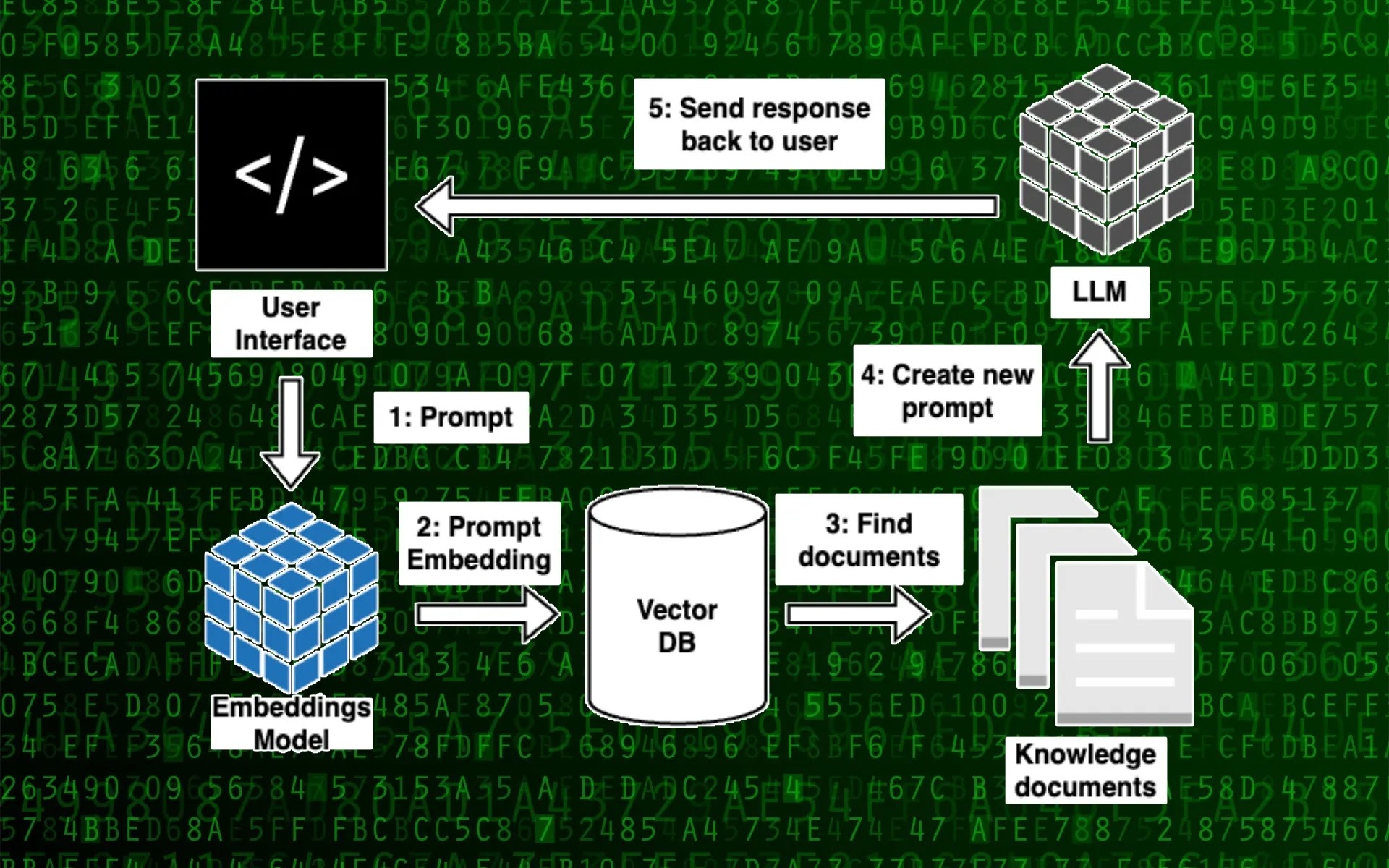
To begin, let's take a broader perspective on the necessary components for building a local language model capable of interacting with your documents.

Open-source LLM: These are compact open-source alternatives to ChatGPT designed to be executed on your local device. Several well-known examples include Dolly, Vicuna, GPT4All, and llama.cpp. These models undergo extensive training on extensive text datasets, enabling them to generate top-notch responses to user inputs.

Embedding Model: An embedding model is employed to convert textual data into a numerical format, facilitating straightforward comparison with other text data. Usually, this is achieved through the application of word or sentence embeddings, which represent text as compact vectors within a multidimensional space. By utilizing these embeddings, it becomes possible to identify documents that are relevant to the user's input.

Vector Database: A database specifically tailored for vector storage and retrieval is intended for efficient handling of embeddings. It allows storing the content of your documents in a format that enables seamless comparison with user prompts.

Knowledge documents: A compilation of documents comprising the information that your LLM will utilize to respond to your inquiries. This is the specific content we've brought together from the different training videos, how-to guides, release notes and best practices guides. How to get this data and bring it together in a readble form for the embeddings is described in my previous post.


Bringing this together


There are a lot of projects available these days to setup your own chatbot. All have different approaches.
Some of the store the embeddings in a public service (eg. Pinecone), other need high-end hardware or rely on public services such as a paid chatgpt account.

During my search I came across the PrivateGPT project and more specific the branch of SamurAIGPT
 
This is more or less ready to use for our demo purpose.

Within this project you can select a local model and with the power of LangChain you can run the entire pipeline locally, without any data leaving your environment, and with reasonable performance.

  • ingest.py uses LangChain tools to parse the document and create embeddings locally using LlamaCppEmbeddings. 
  • It then stores the result in a local vector database using Chroma vector store.
  • privateGPT.py uses a local LLM based on GPT4All-J or LlamaCpp to understand questions and create answers. The context for the answers is extracted from the local vector store using a similarity search to locate the right piece of context from the docs.
  • GPT4All-J wrapper was introduced in LangChain 0.0.162.

To use PrivateGPT, you’ll need Python installed on your computer. 


You can start by cloning the PrivateGPT repository on your computer and install the requirements:

git clone https://github.com/SamurAIGPT/EmbedAI.git 
Go to client folder and run the following commands:
npm install
npm run dev  

Then go to the server folder and run the following commands:

pip install -r requirements.txt
python privateGPT.py 

Now the server is running and we can connect to the webinterface:

  1. Open http://localhost:3000, click on download model to download the required model initially (you only have to do this once)

  2. Upload any document of your choice and click on Ingest data. Ingestion is a quite fast process.

    In this step, we populate the vector database with the embedding values of the provided documents. Fortunately, the project has a script that performs the entire process of breaking documents into chunks, creating embeddings, and storing them in the vector databas.

    You can also dump all your data you want to have ingested in the /server /source documents/ folder. Once you've ingested the data, this folder can be emptied. All the vectors are kept in the database so use this folder only for ingesting new additional information.

  3. Now run any query on your data. Data querying is quite slow and it can take some time until an answer is formulated. And then you can start talking to your local LLM. Also nice to see is that there is alway a reference given in the response, so you know from where the data/knowledge came initialy. This means that you should give your source datafiles a human readable and understandable filename that makes sense.


What is the private LLM workflow ?

  1. So before you can use your local LLM, you must make a few preparations:

  2. Create a list of documents that you want to use as your knowledge base

  3. Break large documents into smaller chunks (around 500 words)

  4. Create an embedding for each document chunk

  5. Create a vector database that stores all the embeddings of the documents


Once this is done, you can start querying the database.

  1. The user enters a prompt in the user interface.

  2. The application uses the embedding model to create an embedding from the user’s prompt and send it to the vector database.

  3. The vector database returns a list of documents that are relevant to the prompt based on the similarity of their embeddings to the user’s prompt.

  4. The application creates a new prompt with the user’s initial prompt and the retrieved documents as context and sends it to the local LLM.

  5. The LLM produces the result along with citations from the context documents. The result is displayed in the user interface along with the sources.

Comparatively, open-source LLMs are more compact than cutting-edge models such as ChatGPT and Bard, and they may not excel in every conceivable task to the same extent. However, when supplemented with your own documents, these language models become highly potent, particularly for tasks like search and question-answering.

Why PrivateGPT ?

By using a local language model and vector database, you can maintain control over your data and ensure privacy while still having access to powerful language processing capabilities. 

PrivateGPT includes a language model, an embedding model, a database for document embeddings, and a command-line interface. It supports several types of documents including plain text (.txt), comma-separated values (.csv), Word (.docx and .doc), PDF, Markdown (.md), HTML, Epub, and email files (.eml and .msg).


Monday, June 26, 2023

Create your own private offline AI Q&A chatbot trained on Veeam data: Part 1

Hi all, in 2 blogposts, I share my journey how i created a self hosted Large Language Model Chatbot trained without the need for fancy high end CPU/GPU and completely offline without dependencies on public / paying services.

This first part is focused on data gathering. As we all now rubbish in is rubbish out, training your model with correct and valuable data will give you good results in the end.

I share you a method to get valueable information from public videos and use them to train your model.

In the second post I’ll talk about actually building the chatbot and training it with your own datasources. Our chatbot can digest a lot of filetypes to create an as rich as possible dataset.

The supported extensions are:

  • .csv: CSV,
  • .docx: Word Document,
  • .doc: Word Document,
  • .enex: EverNote,
  • .eml: Email,
  • .epub: EPub,
  • .html: HTML File,
  • .md: Markdown,
  • .msg: Outlook Message,
  • .odt: Open Document Text,
  • .pdf: Portable Document Format (PDF),
  • .pptx : PowerPoint Document,
  • .ppt : PowerPoint Document,
  • .txt: Text file (UTF-8),

The goals:

  • Building a chatbot without the need for internet, for internal company use
  • No data is exposed externally on public services (keep your data private)
  • Train the bot on a own set of different types of data formats

Where do I get my training data ?

I was already thinking some weeks on doing this and then Ben Young posted his VannyGPT 1.0 on the Veeam community website.

Ben has done a terrific job in using the Veeam KB articles as a datasource.

Since there is no clean data available to train your model, this is already a good start point to gather all necessary data.

But ... I wanted to take it to the next level. 

There are a lot of good videos available on YouTube in several channels and playlists.

Some examples on the official Veeam channel:

  • The Tech Bites Livestreams give valuable information
  • Veeam How To Series, the technical LinkedIn Live sessions with some deep dives.
  • The Veeam How-To Video Series is designed to help users better understand Veeam products and how to use them most effectively.
  • How-To Series: MSP backup

Shouldn't it be nice to get all this content included in our model to train it with more and topic specific Veeam knowledge ?

Well, that’s possible !

I’m not a programmer, just a script kiddie so my code is far from perfect. But together with the help of the public ChatGPT's python assistance, I was able to construct some scripts in Python to grab all this content to text files to build a valid training set.

What are our ingredients ?

The youtube-transcript-api project which easy allows to get transcripts from youtube videos. (both generated transcripts and regular transcripts)

https://pypi.org/project/youtube-transcript-api/

The Google API Discovery Service

We’ll need this to fetch all the videos part of a certain playlist, based on the playlistID

To be able to use this Google API you need a developer key, which you can get for free in your Google account.

How to create this key can be found at:

https://cloud.google.com/docs/authentication/api-keys

First of all I was just playing around with a single video to start with. As you probably know every video had his own Youtube Video ID. So I didn’t need a Google API key.

  srt = YouTubeTranscriptApi.get_transcript("em1M98GiQ0c",languages=['en']) 

When using the youtube-transcript-api library, you’ll see you get a ton of information on the transcripts of videos. Not only the language but also starting timestamp of the text and the duration of it.

A point of attention is that this library uses an undocumented part of the YouTube API, which is called by the YouTube web-client. So there is no guarantee that it won't stop working tomorrow, if they change how things work.

So the raw output looks like:

 [{'text': 'okay welcome back to the next upgrade', 'start': 0.78,
'duration': 4.2}, {'text': 'Center video', 'start': 3.6, 'duration': 4.8},
{'text': 'so the first two that are out there', 'start': 4.98, 'duration':
6.6}, {'text': "was Kirsten's upgrading V1 and then my", 'start':
8.4, 'duration': 5.819}, {'text': "Enterprise Manager and it's important
to", 'start': 11.58, 'duration': 5.279}, {'text': 'do these in the right
sequence here so', 'start': 14.219, 'duration': 4.381}, {'text': 'start with
those', 'start': 16.859, 'duration': 4.201}, {'text': "and what we're
going to do now is go", 'start': 18.6, 'duration': 5.519}, {'text': 'into
a BNR server upgrade and then the', 'start': 21.06, 'duration': 6.539},
{'text': 'components and agents so um to get your', 'start': 24.119,
'duration': 6.301}, {'text': 'ISO your download installable when you', 'start':
27.599, 'duration': 3.721}, {'text': 'log in', 'start': 30.42, 'duration':
3.659}, {'text': 'just click on downloads up here and then', 'start': 31.32,
'duration': 5.28}, {'text': "you'll go down and um", 'start': 34.079,
'duration': 5.281}, {'text': "I've been getting the advanced 

Playing around with some REGEX allows you to filter out the exact part of text we need for further processing.

 pattern = r"'text': '(.*?)','start'"
   for i in srt:      # writing each element of srt on a new line
       match = re.findall(pattern, str(i))

The “de-um-ifyer”

But then when checking the output of several video’s I’ve noticed something on the subtitles created by YouTube:


When people are giving demo’s or just talking during presentations with slides, there are a lot of stop-words, uh, um, yeah’s and other words are included in the transcript and will pollute our source data.

A large language model (LLM) gives a certain weight to words and their relations. So when we leave it like this, these words are quite frequent in our learning data and makes our chatbot also using these words.

So I introduced a small check, let’s call it the “de-um-ifyer”

 if match:
     extracted_text = match[0]
     words_to_remove = ['yeah', 'uh', 'um', '[music]']
     modified_text = extracted_text
     for word in words_to_remove:
         modified_text = modified_text.replace(word, '')


For each line of text that the TranscriptApi spits out, we check it against a predefined set of words you don’t want to include in your dataset. Typical YouTube also indicates when music is playing in the generated script with the text [Music]. Of course, this we don’t need in our model and filter it out.

So when we bring this together we already can get a good transcript of every Youtube video we can imagine.

Scaling up

Time to make it more scalable now. Just entering the video ID’s is a painfull job. We can collect them in a file, cycle through the file and get the transcripts, but most of the videos I want to use to train my model are organised in playlists. So wouldn’t there be an easy solution when giving the playlist ID ? 

Just fetch all the underlying video id’s of the videos in that playlist and get their transcripts.

This is possible ! Therefore we need our Google API which I mentioned above.

With the usage of this key we can call the Youtube API via the googleapis.com endpoint and get all the items back in a playlist.

Within the returning JSON, you'll fnd the videoId which we need to download the transcripts of the individual videos.

The call i’ve used get’s the results in several pages if there are more than 50 video’s in one playlist so we have to cycle through the playlist.

# Function to retrieve all video IDs from a playlist
def get_video_ids(playlist_id):
    video_ids = []
    next_page_token = None
    while True:
        # Construct the request URL
        url = f'https://www.googleapis.com/youtube/v3/playlistItems?part=contentDetails&maxResults=50&playlistId={playlist_id}&key={api_key}'
        if next_page_token:
            url += f'&pageToken={next_page_token}'

        # Send the GET request to the YouTube Data API
        response = requests.get(url)
        data = response.json()

        # Extract video IDs from the response
        for item in data['items']:
            video_ids.append(item['contentDetails']['videoId'])

        # Check if there are more pages
        next_page_token = data.get('nextPageToken')
        if not next_page_token:
            break

    return video_ids
 

Get the video titles and use them as filenames

Maintaining you source training data can be hard when you have a lot of documents, so an unique name would be a good start. Therefore I fetch the video title and use it as the filename when writing the transcript in text format. 

The function looks like this:

 def get_video_title(video_id):
    # Request the video resource
    video_response = youtube.videos().list(
        part='snippet',
        id=video_id
    ).execute()
    # Extract the title from the response
    video_title = video_response['items'][0]['snippet']['title']
    return video_title
  

Taping it all together:

Time to glue everything together in one python script. This script will now download all videos of a playlist, get the English transcription of it, remove the stop-words and save it in an UTF-8 format text file.

 import requests
 from youtube_transcript_api import YouTubeTranscriptApi
 import re
 import googleapiclient.discovery
 import os
 # Set your API key
 api_key = 'InsertYourAPIKeyHere'

 # Playlist ID from the YouTube URL you provided
 playlist_id = 'PL0afnnnx_OVCW8nmECmiR3z34beBe2l0-'
 youtube = googleapiclient.discovery.build('youtube', 'v3', developerKey=api_key)

 # Function to retrieve all video IDs from a playlist
 def get_video_ids(playlist_id):
     video_ids = []
     next_page_token = None

     while True:
         # Construct the request URL
         url = f'https://www.googleapis.com/youtube/v3/playlistItems?part=\contentDetails&maxResults=50&playlistId={playlist_id}&key={api_key}'
         if next_page_token:
             url += f'&pageToken={next_page_token}'

         # Send the GET request to the YouTube Data API
         response = requests.get(url)
         data = response.json()

         # Extract video IDs from the response
         for item in data['items']:
             video_ids.append(item['contentDetails']['videoId'])

         # Check if there are more pages
         next_page_token = data.get('nextPageToken')
         if not next_page_token:
             break

     return video_ids
 def get_video_title(video_id):
     # Request the video resource
     video_response = youtube.videos().list(
         part='snippet',
         id=video_id
     ).execute()

     # Extract the title from the response
     video_title = video_response['items'][0]['snippet']['title']

     return video_title

 # Call the function to get the video IDs
 video_ids = get_video_ids(playlist_id)

 # Print the video IDs
 for video_id in video_ids:
     try:
         srt = YouTubeTranscriptApi.get_transcript(video_id,languages=['en'])
     except:
         print(f"{video_id} doesn't have a transcript") # Skip videos with no transcripts available
     title = get_video_title(video_id)
     title = str(title.replace('/', '-'))  
     pattern = r"'text': '(.*?)', 'start'"

     with open(title+".txt", "w",encoding='utf8') as f:   
   
         # iterating through each element of list srt
         for i in srt:
             # writing each element of srt on a new line
             match = re.findall(pattern, str(i))

             if match:
                 extracted_text = match[0]
                 words_to_remove = ['yeah', 'uh', 'um','[Music]']
                 modified_text = extracted_text

                 for word in words_to_remove:
                     modified_text = modified_text.replace(word, '')
                 f.write(modified_text+'\n')

What's next ?

These files will be part of the many datasources we're going to use to train our datamodel which I'll explain in my next post. The model is completely standalone, doensn't need any internet service or paid account to get it working.


This means that al the data is kept private and allows you to use this model to work with internal documenten without fearing that data is leaking to the outside world.